COMPANY
LG Electronics
DURATION
2 years
MY ROLE
UX/UI Designer
ACTIVITIES
User interviews / Information architecture design / UI design / Prototyping / Usability testing
OVERVIEW
The SVL Simulator is made up of two apps that work together to run simulations. The first one is a web app – it's where you create and manage your simulations and assets. You can also use it to review results and share completed simulations. The second is a desktop app, designed to run and visualize simulations in real time on your computer. In current case study, I’ll walk you through the process of designing the web application.
Right from the start, I needed to understand who our potential users were and what problems we could help them solve. To get those insights, I created a questionnaire and shared it with 8 respondents. After analyzing the results, I was able to build the following user persona.

The questionnaire results clearly highlighted the core functionality our users needed, which allowed me to quickly map out the information architecture of the future app. The overall structure turned out to be fairly simple – which is a big win. One key feature is that the simulation must be launched from the web app the first time (since that’s where it’s created), but after that, as long as all simulation files are cached locally, it can be run directly from the desktop app.
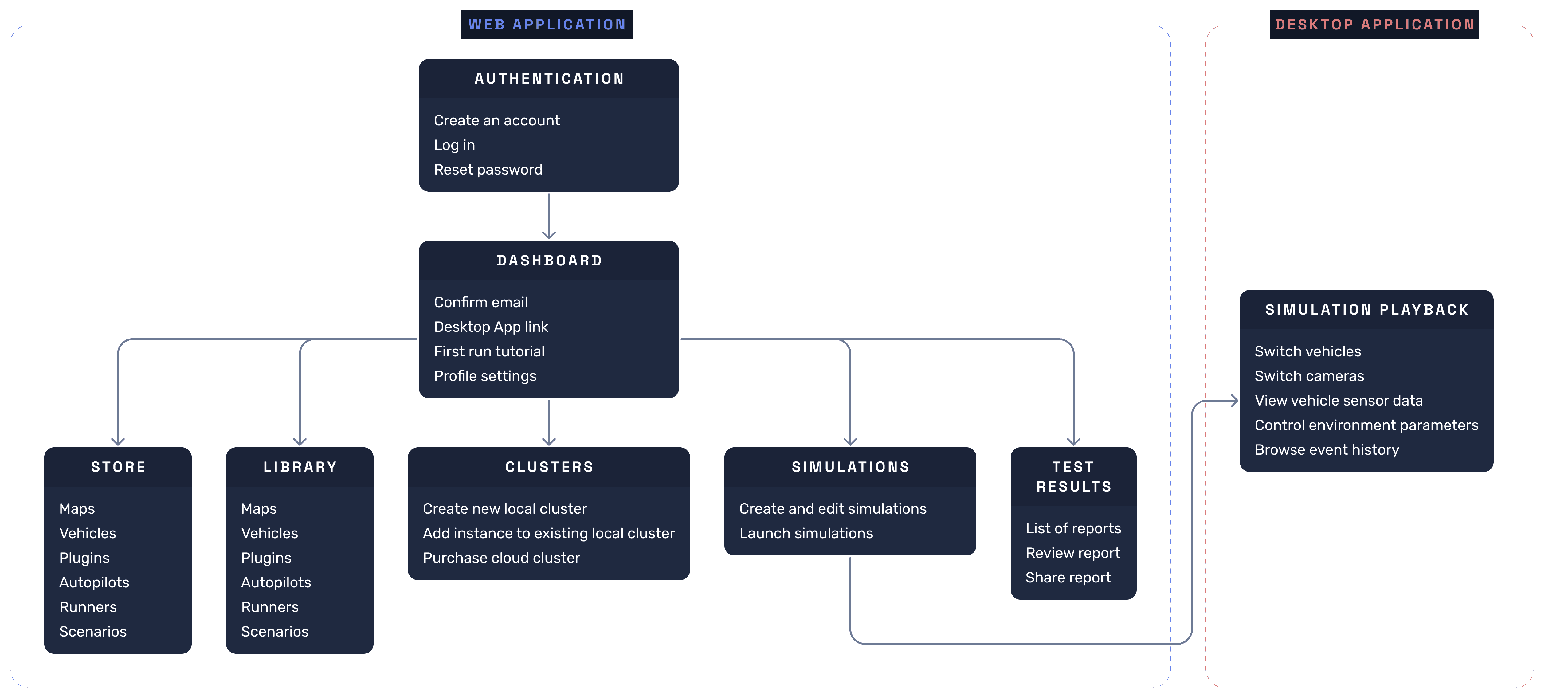
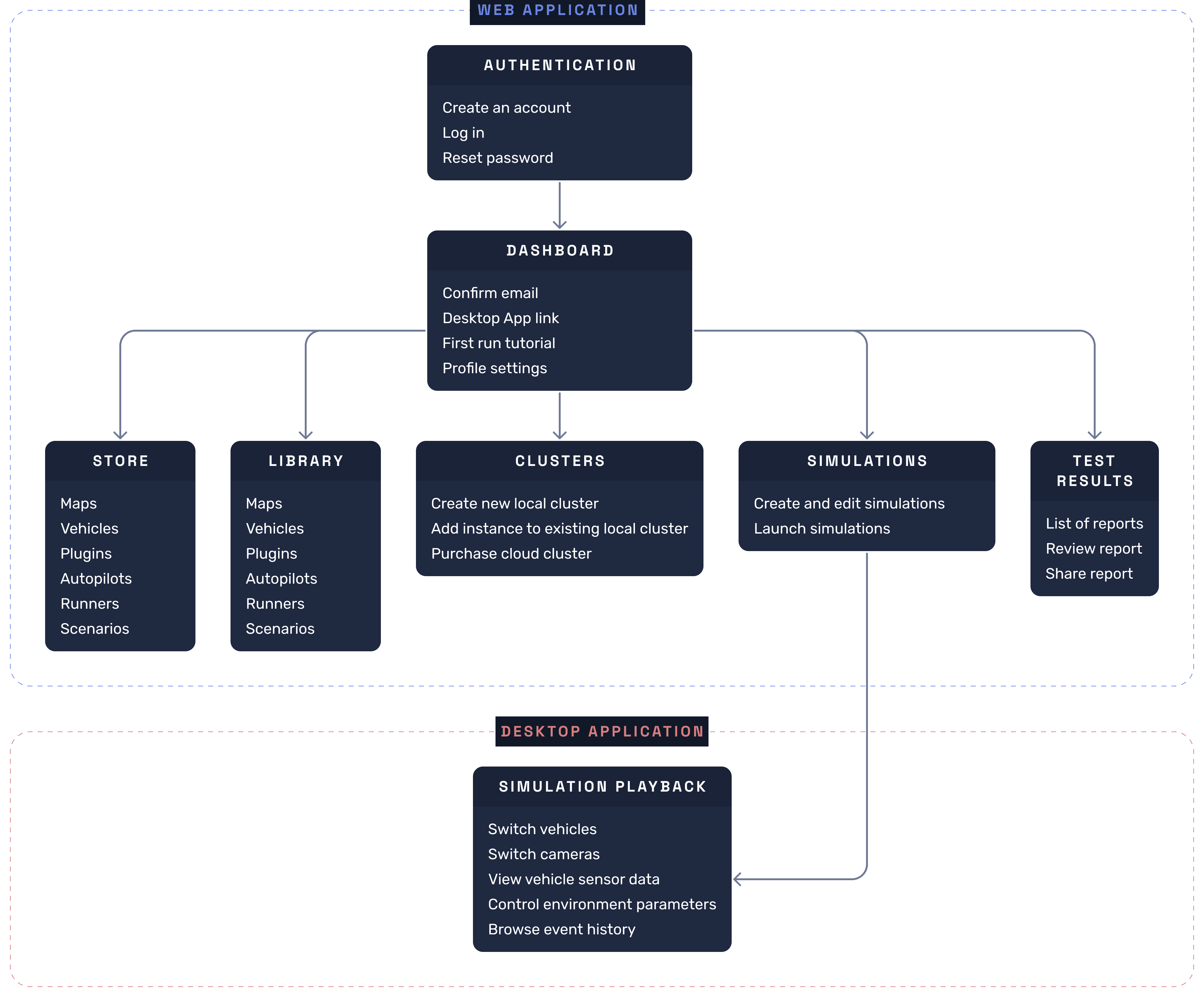
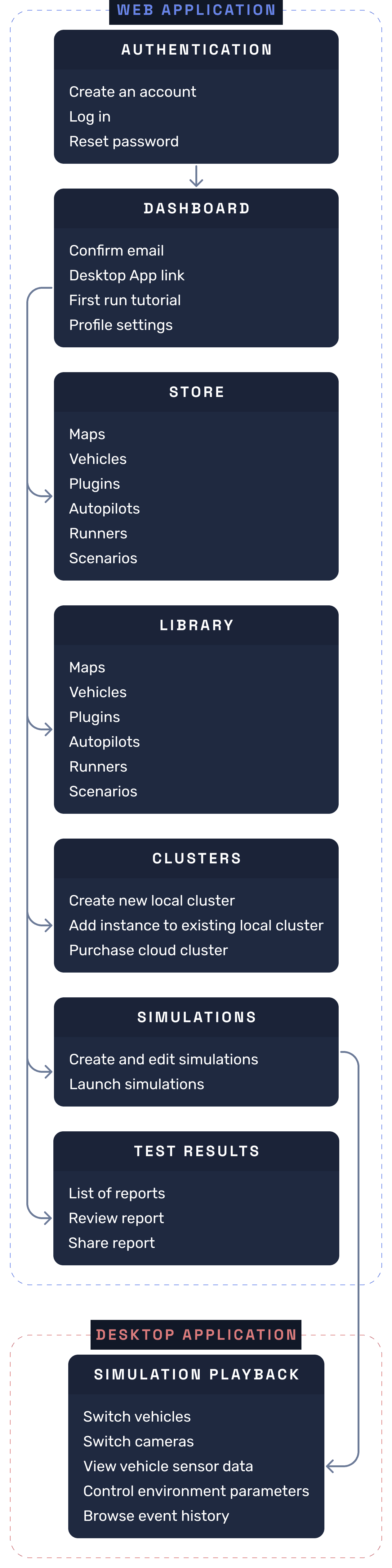
The entry point is a straightforward login screen – nothing to distract, nothing in the way. Once in, new users land on a guided onboarding flow that gets them from zero to their first running simulation in five steps. The Profile page handles the full range of account management, including an Advanced section with Docker Registry credentials and CLI authentication tokens – useful for teams integrating the simulator into their CI/CD pipelines.
Every simulation is built from assets – maps define the environment, vehicles are what gets tested, autopilots drive them, and sensors, runners, and scenarios tie it all together. The Store is where users browse and add all of these from the platform's catalog. It's essentially a marketplace: find what you need, add it to your account, and it's ready to use in any simulation you build.
The Library is the personal asset workspace. It holds everything a user has added from the Store, but also lets them upload their own custom assets – whether that's a proprietary vehicle model, a hand-tuned autopilot, or a custom map of a specific test environment. And the loop closes nicely: any asset built in-house can be published back to the Store, making it available to the wider community. This was an important flow to get right, since a lot of our users are actively building and sharing their own tools, not just consuming what's already there.
One of the key requests from developers was the ability to run distributed simulations across multiple machines. To support this, I designed a Clusters section where users can create a local cluster, add machines to an existing one, or purchase a cloud cluster for teams that don't want to manage their own infrastructure. Each machine in a cluster runs the SVL Simulator desktop app – which is what actually handles the link between hardware and the web platform.
This is the core of the web app – where simulations are created, configured, and launched. Users can set up all the parameters here before sending the simulation to the desktop app with a single click. I designed it to be as straightforward as possible, since this is the flow users return to most often.
Once a simulation is complete, users need a place to review what happened. The Test Results section gives them a list of all past reports, the ability to open and dig into any of them, and – importantly – the option to share reports with teammates or stakeholders. Sharing was a direct ask from the research, so I made sure it was easy to find.
After launching the redesigned SVL Simulator Web App, I measured the impact across three areas that mattered most to our users.
– Simulation setup time dropped by 30%, based on task-completion tests comparing the new asset management flows – Store and Library – against the previous version.
– The number of successfully published community assets increased by 45% in the first month, which validated the decision to make the Store publishing flow accessible directly from the Library.
– Overall platform satisfaction improved by 55%, measured through NPS surveys – largely driven by the onboarding improvements and the cleaner cluster management experience.
SETUP
time
-0%
ASSET
SHARING
+0%
User
satisfaction
+0%